Practical guide
SGF VW Crops the View, Not the Board Position
VW selects which board points are visible; it does not remove the stones outside that view. The selection is inherited by child nodes until a new VW value changes it. An empty VW[] restores visibility to the whole board.
A smaller view is not a smaller position
If an SGF shows only a corner, first check VW before concluding that stones are missing. The FF4 property specifies visible points: other points are invisible. It is an inherited property, so a child node without a new VW retains the active selection. [1] [2]
Board dimensions still come from SZ, and occupancy still comes from setup and moves. A view property does not clear an outside stone or calculate a capture. Before analysing a cropped exercise, obtain the complete position so the hidden part does not become an assumption.
Some viewers may present visibility differently or lack support for the property. This guide explains the file’s specified meaning and gives original data to inspect. It does not claim an import-and-export test in a named viewer.
Follow one selection through three nodes
(;FF[4]GM[1]CA[UTF-8]SZ[19]AB[bb]AW[rr]VW[aa:cc]C[Full position has two stones; chosen view is only the upper-left corner.];C[No new VW here; inherit the parent view.];VW[]C[Clear the view restriction; encoded stones remain unchanged.])The complete board has 19 columns and 19 rows. Its only black stone is bb; its only white stone is rr. Every other point is empty. There are no moves or later setup changes in these three nodes, so the stone position stays identical.
Download the inherited-and-cleared VW record. Keep your own record unchanged; these are original teaching examples.
The root VW selects the nine points in the upper-left aa:cc rectangle. The middle node supplies only a comment and inherits that view. At the final node, VW[] supplies an empty view value: under FF4, that restores the whole board to visibility. [1] [2]
An empty value is therefore a defined action here, not the same as omitting the property. Omission at the middle node leaves inheritance active; the explicit empty value at the final node clears that restriction.
Keep the hidden stone in your position notes
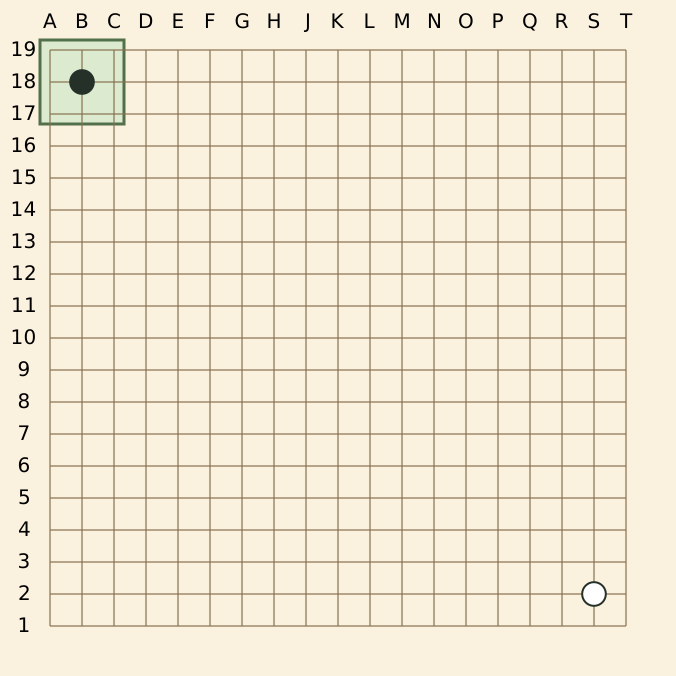
The selected set is aa, ab, ac, ba, bb, bc, ca, cb, cc. It includes black bb and excludes white rr. The white stone nevertheless remains encoded in the position. The diagram deliberately shows it so you can compare view and occupancy.
Display columns in this 19×19 illustration run A–H and J–T, omitting I; display rows run 19 at the top to 1 at the bottom. Raw SGF coordinates do not adopt that printed convention. Read the existing coordinate guide when translating.
Compare the active view at each node
On a narrow screen, scroll the comparison sideways. Keyboard users can focus the table and use the arrow keys.
| Node | VW supplied at this node | Active visible set | Encoded stones |
|---|---|---|---|
| Root | [aa:cc] | 9 upper-left points | Black bb; white rr |
| First child | None | The inherited same 9 points | Black bb; white rr |
| Second child | [] | All 361 points | Black bb; white rr |
The final count is 19 × 19 = 361 visible intersections. “Visible intersections” is not “stones”: this board still contains only two stones. A crop count must not be substituted for the number of pieces or for the board dimensions.
A new nonempty VW value would replace the active selection at that node. Its descendants would inherit the new value until another change. To diagnose a view on a deeper branch, walk its ancestors along that branch rather than checking only the selected node.
Do not replace a view change with a setup edit
If you want to show the complete existing position, clear the view on an appropriate node in a copy; do not use AE to remove the supposedly hidden stone. AE changes setup occupancy. [6] VW changes visibility. Those operations solve different tasks. [1] [2]
Likewise, changing SZ from 19 to 3 does not describe the same corner view. It changes the dimensions and invalidates or changes the interpretation of points outside the new board. Keep the intended 19×19 size when the goal is to reveal a 19×19 position.
- Preserve the original SGF and identify the exact node or branch being viewed.
- Resolve the root SZ and reconstruct all encoded stones up to that node.
- Walk that branch from the root and locate the latest active VW.
- Expand its points, or apply the explicit empty value as whole-board visibility.
- Compare the complete position with the visible subset, then check what your viewer supports.
A compact point range still needs valid corners and unique points. Use the range guide if the selected area itself is unexpected.
Two view decisions
The first child has no VW, but the white stone at rr is not visible. Did the file delete it?
No deletion is encoded in this example; the corner view is inherited.
The root includes AW[rr] and selects only aa:cc. The middle node changes no stones and supplies no new VW. The complete position retains rr, even though that point lies outside the active visible set. Check your actual file for separate setup or move changes before extending this conclusion.
I want the next node to show the whole 19×19 board. Is removing VW from that child enough?
An omitted child property still inherits the parent view; use the defined empty VW[] to clear it.
The final node in the sample explicitly supplies the empty value, so all 361 intersections become visible. The two stones remain where they were. In a viewer that does not implement VW, inspect the original record and its display behavior separately.
Record the view and the full board separately
For these files, the grammar, nine-point selected set, absence of a new middle-node VW, final empty value and unchanged two-stone occupancy were checked separately. The complete-context SVG was generated from the original point data. No game history, viewer roundtrip or Go legality result is implied.
When sharing a cropped teaching exercise, provide its complete record, state the intended view, and name any analysis boundary. Continue with SZ defaults and rectangles when the board’s actual dimensions remain unclear.
Sources and further reading
- SGF FF4: file format specificationText escaping, property scope and compressed point-list rules.
- SGF FF4: VW propertyInherited view selection and an empty value restoring visibility.
- SGF FF4: SZ propertyRoot board size, square and rectangular forms.
- SGF FF4: AB propertySetup stones and unique point lists.
- SGF FF4: AW propertyWhite setup stones.
- SGF FF4: AE setup propertyClearing stones changes occupancy and does not count as taking prisoners.