Practical guide
SGF Triangles, Squares and Labels: Marks Are Not Stones
TR, SQ, CR and MA mark intersections; LB attaches text to a point. None of those properties supplies a black or white stone. Reconstruct the stones first, then overlay the marks, even when a mark appears at an empty intersection.
Separate the position from its annotations
A triangle at an intersection does not mean a black stone was placed there. In FF4, TR, SQ, CR and MA are markup properties, while AB and AW are setup properties. LB combines a point with label text. Read those roles before reconstructing the diagram. [7] [8] [1]
Start with the stones supplied by setup or by the move sequence up to the selected node. Then add that node’s annotations. Marks can identify a stone, an empty point or an area of interest, but do not by themselves supply a move or change its color.
Our example uses a complete 9×9 setup board with no moves. It has one black stone at cc and one white stone at gg. This deliberately small position lets you check every annotation without inferring a missing game history.
A complete board with five annotations
(;FF[4]GM[1]CA[UTF-8]SZ[9]AB[cc]AW[gg]TR[cc]SQ[ff]CR[aa]MA[bb]LB[ii:R])The complete stone list is black cc, white gg; every other intersection is empty. The triangle is at cc, square at ff, circle at aa, cross at bb, and the label R at ii. Four annotated points are empty; the triangle overlays the black stone.
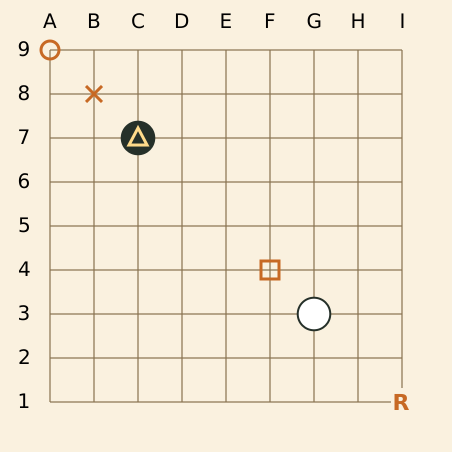
Download the complete marked-board example. Keep your own record unchanged; these are original teaching examples.
This is an original teaching record, not a position claimed to come from a played game. The square and cross are symbols drawn over empty points; they are not extra white stones or captures. The letter R is an arbitrary example label, not an established recommendation.
Use each property’s actual symbol and value type
On a narrow screen, scroll the comparison sideways. Keyboard users can focus the table and use the arrow keys.
| Property | Example | Meaning here |
|---|---|---|
| AB | AB[cc] | Black setup stone at cc |
| AW | AW[gg] | White setup stone at gg |
| TR | TR[cc] | Triangle at cc |
| SQ | SQ[ff] | Square at ff |
| CR | CR[aa] | Circle at aa |
| MA | MA[bb] | X-shaped mark at bb |
| LB | LB[ii:R] | Text R centered on point ii |
The FF4 property sections specify these symbols and require unique points within the respective lists. MA is an X-shaped mark; it is not a generic instruction to choose any symbol. Do not rename it to a stone property simply because a viewer’s icon resembles another mark. [2] [3] [4] [5] [6]
Point lists can contain more than one value, but each property identifier occurs only once per node. For rectangle expansion and duplicate checks, use the compressed point-list guide. Expanding a markup rectangle still selects marks, not stones.
Read LB as a point plus SimpleText
In LB[ii:R], ii is the point and R is the label text. The colon separates the two parts of this composed value. Label text is SimpleText; its whitespace rules differ from a C comment’s Text rules. FF4 places the text centered on the point and gives no length restriction for the label itself. [1] [6]
A format allowing long text does not make a long paragraph readable over a small board. Use a short label in the diagram and explain it in the adjacent prose or comment. For teaching, list the point and the meaning explicitly so the explanation survives a printout, reduced image or different viewer font.
When a literal colon or backslash belongs to the composed text, follow the FF4 escape rules rather than splitting the label again by eye. Consult escaping and whitespace before editing raw values. A label that says “Black” still does not supply a black stone at that point.
Remove the annotations and compare occupancy
(;FF[4]GM[1]CA[UTF-8]SZ[9]AB[cc]AW[gg])Download the same stones without annotations. Keep your own record unchanged; these are original teaching examples.
Comparing these two original files leaves exactly the same occupancy: black cc and white gg. What disappears is the five marks and labels, not any stone. This is a useful check when a marked exercise seems to contain more stones than its setup list.
- Select the same node and reconstruct its stone position.
- List AB/AW or the already executed moves separately from TR/SQ/CR/MA/LB.
- Temporarily inspect a copy with the annotation properties omitted. Do not alter the original.
- Compare the complete black and white point sets. They should be unaffected by removing only these marks.
- Keep a written annotation key next to the board instead of using shape or color as an undocumented rule.
If the compared files also contain different setup properties or moves, the test no longer isolates markup. Check those changes separately before concluding that a viewer changed a stone.
Two annotation decisions
A triangle is drawn at cc and a square at ff. Are both occupied?
Only cc is occupied in this example.
AB[cc] supplies the black stone. TR[cc] marks it. SQ[ff] annotates an otherwise empty intersection. The complete white list contains only gg. Check the stone properties before drawing any additional piece.
A label says R at ii. Does that encode the next recommended move?
It encodes label text at ii; its teaching meaning must be explained separately.
LB has no built-in promise that R means “right move,” or that a move happened there. In this record ii is empty. An author can define R in the prose, but the mark alone is not a played move, an engine evaluation or proof of legality.
Compare the file with what the viewer shows
The examples were checked for grammar and their exact setup and annotation lists using sgfmill 1.1.1. The two stone sets were also compared without the marks. This confirms the teaching data, not the visual support or rendering of any particular viewer.
If an annotation is absent, check the raw property, the selected node and the viewer’s supported display options before rewriting the position. If a whole region disappears, continue with VW view selection; that is a separate visibility question.
Sources and further reading
- SGF FF4: file format specificationText escaping, property scope and compressed point-list rules.
- SGF FF4: TR propertyTriangle markup at points.
- SGF FF4: SQ propertySquare markup at points.
- SGF FF4: CR propertyCircle markup at points.
- SGF FF4: MA propertyX-shaped markup at points.
- SGF FF4: LB propertyPoint and SimpleText label values.
- SGF FF4: AB propertySetup stones and unique point lists.
- SGF FF4: AW propertyWhite setup stones.